

- hbuilderx怎么将代码加粗 12-15 18:04
- Hbuilderx怎么更改文件扩展名 12-15 17:56
- hbuilderx官网入口 12-15 12:02
- Hbuilderx怎么刷新资源文件夹 12-15 11:21
- hbuilderx怎么关闭空格代替制表符 12-15 11:18
- hbuilderx怎么开启显示长行指示竖线 12-15 11:13
- hbuilderx怎么设置超时时间属性 12-15 10:34
- hbuilderx怎么配置编辑器行高 12-15 10:31
hbuilderx怎么启用px转rem提示,是不是还有很多小伙伴不是很清楚呢?本文为大家带来详细的启用教程分享,快一起来看看吧!

1、进入软件,点击上方菜单栏中的工具,选择下方选项列表中的"设置"。

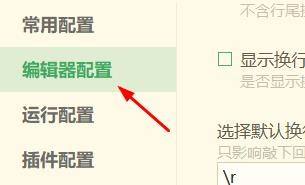
2、在打开的窗口界面中的,点击左侧中的"编辑器配置"选项。
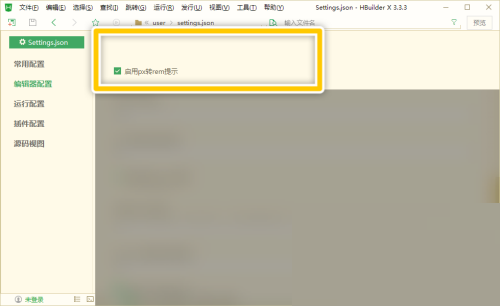
3、然后找到右侧中的"启用px转rem提示",将其小方框勾选上即可。
49.86MB / 2026-08-11
43.33MB / 2026-08-07
27.78MB / 2026-08-07
54.03MB / 2026-08-07
43.08MB / 2026-08-07
311.74MB / 2026-08-09
34.09MB
2026-08-07
4.32MB
2026-08-07
19.57MB
2026-08-07
311.74MB
2026-08-09
140.75MB
2026-08-07
177.75MB
2026-08-07
42.78MB / 2026-06-22
84.55MB / 2026-03-23
248.80MB / 2026-02-07
2.79MB / 2026-07-23
25.97MB / 2026-04-29
1.90MB / 2026-05-07
210.99MB / 2026-07-13
京ICP备14006952号-1 京B2-20201630 京网文(2019)3652-335号 沪公网安备 31011202006753号违法和不良信息举报/未成年人举报:legal@3dmgame.com
CopyRight©2003-2018 违法和不良信息举报(021-54473036)400-105-5185 All Right Reserved