

- Potplayer怎么设置倍速播放 12-15 15:26
- PotPlayer怎么旋转视频 12-15 15:09
- PotPlayer怎么设置自动选择语言 11-05 09:52
- PotPlayer怎么连续截图 11-04 17:24
- PotPlayer怎么导入字幕文件 11-04 15:16
- PotPlayer怎么设置左侧显示预览 11-04 15:13
- PotPlayer怎么自定义窗口尺寸 11-04 15:11
- PotPlayer皮肤怎么自定义配色 11-04 15:09
PotPlayer是一款非常不错的视频播放的工具,内置强大的解码器。这里为用户们带来关于PotPlayer设置允许使用触摸功能的方法分享,希望可以帮助大家!
1、双击打开软件,右击页面空白处,选择列表中的"选项"打开。
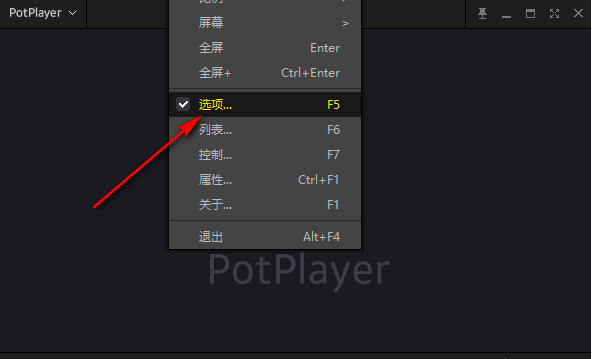
2、进入到新的窗口界面后,点击左侧栏"基础"前的"+"按钮。
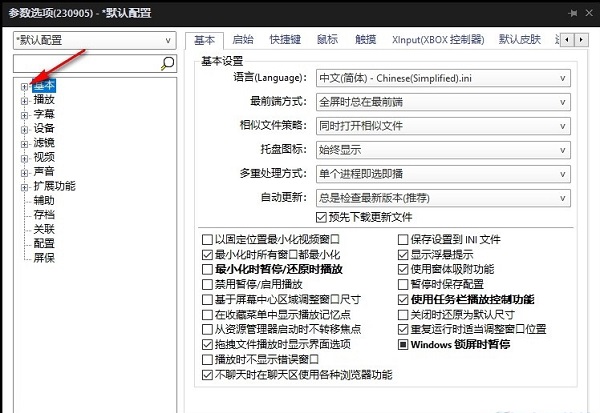
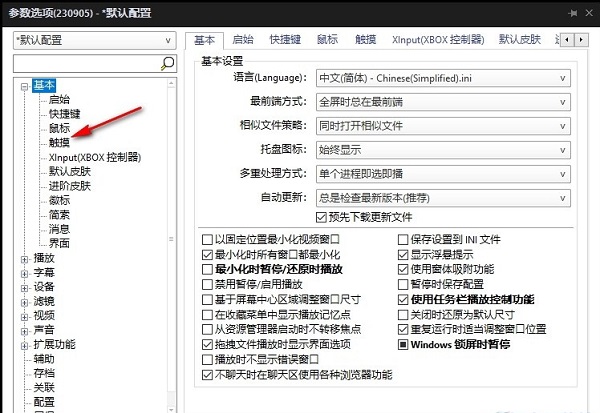
3、随后点击其中的"触摸"选项。
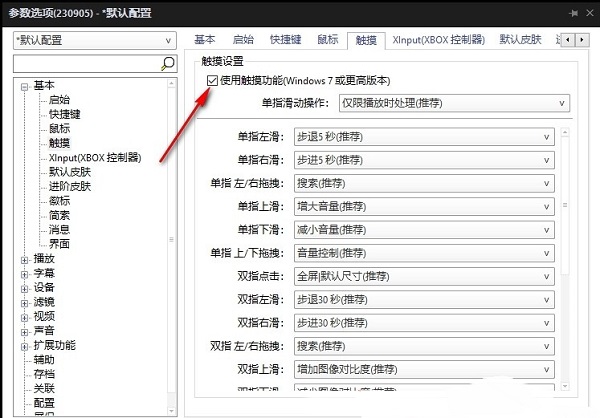
4、然后找到右侧中的"使用触摸功能",最后将其小方框给勾选上就可以了,
146MB / 2026-08-07
2.17GB / 2026-08-07
174KB / 2026-08-07
1.92MB / 2026-08-07
111.10MB / 2026-08-07
328.49MB / 2026-08-07
69.93MB
2026-08-04
28MB
2026-08-05
108.34MB
2026-08-05
6.93MB
2026-08-05
1.53MB
2026-08-05
7.82MB
2026-08-05
42.78MB / 2026-06-22
84.55MB / 2026-03-23
248.80MB / 2026-02-07
2.79MB / 2026-07-23
25.97MB / 2026-04-29
1.90MB / 2026-05-07
210.99MB / 2026-07-13
京ICP备14006952号-1 京B2-20201630 京网文(2019)3652-335号 沪公网安备 31011202006753号违法和不良信息举报/未成年人举报:legal@3dmgame.com
CopyRight©2003-2018 违法和不良信息举报(021-54473036)400-105-5185 All Right Reserved